Most workplace software was built for someone sitting at a desk. Hourly and frontline workers were an afterthought — a login screen designed for an office worker, handed to someone who’s on their feet all shift with no time to dig through a company intranet. That mismatch is why so many hourly employees still end up doing the same thing every week: walking to the back office, waiting for a supervisor, and asking a question that a machine could have answered in ten seconds.
That’s changing. A growing number of workplaces — warehouses, hospitals, manufacturing floors, retail stores, senior living communities — now put a self-service kiosk right on the floor, so employees can handle the basics themselves. Here’s what that actually looks like day to day, and what to expect if your employer rolls one out.
In This Article:
What a Self-Service Kiosk Actually Does
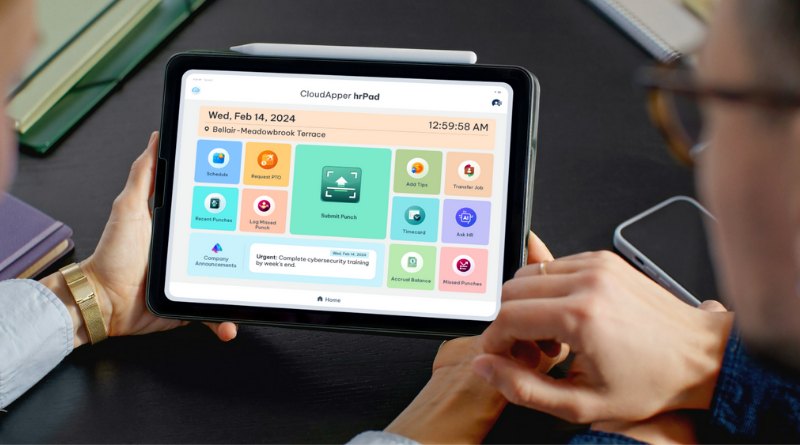
Think of it as a shared tablet or terminal near the break room, time clock, or entrance. You badge in, and instead of a hallway conversation, you get a simple menu of things you can do on your own:
Check your schedule. See your upcoming shifts, swap requests, and any open shifts you’re eligible to pick up — without waiting for a printed schedule to go up on the wall.
Request time off. Submit a request from the kiosk itself. It routes to your manager automatically, and you can see whether it’s pending, approved, or denied — no chasing anyone down.
Track your attendance. Clock in and out, and see your own hours, on-time record, and any missed punches, so nothing is a surprise on payday.
Handle the small stuff. Update a W-4, check a pay stub, view a benefits summary, or ask an HR question — often with an AI assistant built in that can actually answer it, instead of pointing you to a phone number.
None of this requires a company email address, a laptop, or even a smartphone. That matters, because a large share of hourly workers don’t have a company device — the kiosk is often the only computer they touch on the job. Also Read: Employee Self Service Kiosk For Workday Time Tracking and Payroll
Why This Matters for the Person on the Floor
The old way cost you something real: time out of your shift, a supervisor pulled away from their own work, and a delay before you got an answer. Multiply that across a shift, a store, or a hospital floor, and it’s not a minor inconvenience — it’s hours of lost productivity for the whole team, every week.
Self-service flips that. You get an answer in the moment you need it. Your manager isn’t interrupted for a question the system can answer on its own. And because everything is logged the moment it happens — the request, the punch, the approval — there’s no ambiguity later about who asked what, or when.
What to Expect the First Time You Use One
It’s built for a shared device. You’ll typically badge in with an ID card, PIN, or fingerprint, not a personal login, since one kiosk usually serves an entire shift or department.It’s fast on purpose. These are designed for someone with two minutes between tasks, not someone sitting down to browse — a few taps, and you’re done.It doesn’t replace your manager. It replaces the parts of the conversation that didn’t need to be a conversation. Anything that genuinely needs a person still goes to a person.
The Platform Behind the Kiosk: CloudApper hrPad
The organizations getting this right aren’t buying a kiosk as a standalone gadget. They’re closing a gap their core HR system — whether that’s UKG, Workday, SAP, or another platform — was never built to close on its own: giving frontline employees who don’t sit at a desk the same self-service access that office employees have always had.
CloudApper hrPad is making that possible. It sits on top of whatever HCM or workforce system a company already runs, and turns any tablet or shared device into a full employee self-service kiosk — scheduling, time off, attendance, pay stubs, and an AI assistant that answers HR questions on the spot, all connected back to the system of record in real time. No separate database to maintain, no employees falling outside the system just because they don’t have a company laptop, no waiting on a vendor roadmap to add frontline support that should have been there from the start.
For the organization, that means every employee — not just the ones at a desk — is actually inside the workforce system, which means cleaner data, fewer manual corrections, and HR teams freed from answering the same handful of questions on repeat. For the frontline worker, it means the basic dignity of getting an answer to “am I working Saturday?” without having to track someone down to ask.
CloudApper is the process layer that closes the gaps enterprise software can’t — across HR, ERP, CRM, and beyond, on any platform, in weeks not quarters. Because the organizations that move fastest aren’t the ones with the biggest budgets or the best vendors. They’re the ones that stopped waiting for permission to close the gap — including the gap between their HR system and the people actually doing the work.